Apologies, our previous post concerning the SMS text alerts was incorrect, and has been updated below. We apologize for an issues or confusion this may have caused.
Have you registered for the emergency text alerts from Avid? If you have not then you are missing out on being notified about emergency events in our community such as emergency water shut offs and more.
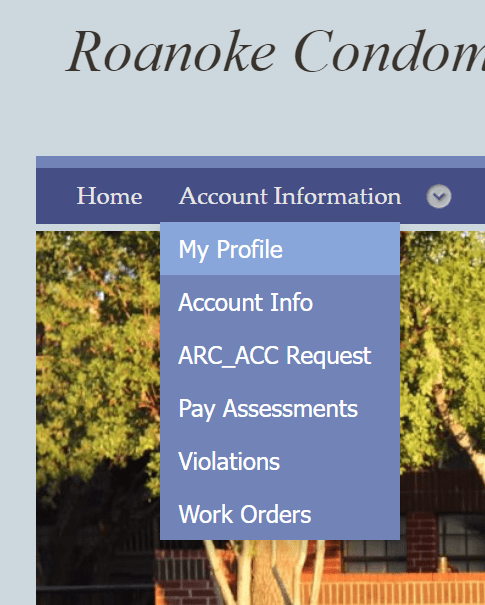
To get connected, log into your member portal at https://apm.cincwebaxis.com/ and navigate to My Profile under Account Information
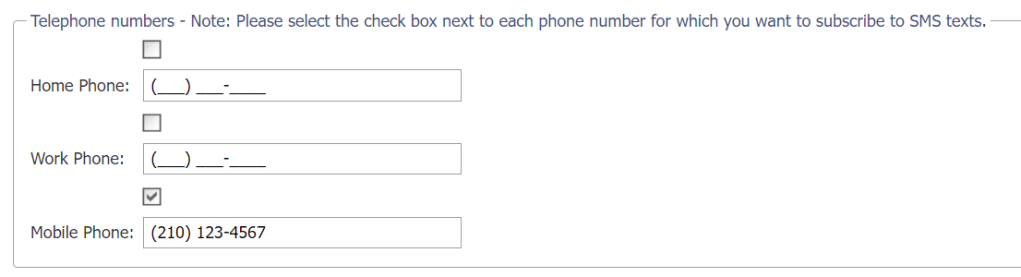
In this page, you will see a section for entering phone numbers, where you will need to check the box above the Mobile Phone field, enter your cell phone number in the Mobile Phone field, and then click submit a the bottom of the page. This will then subscribe you to SMS text alerts from Avid Property Management.
 The Roanoke